Waiting for page loading
When I started embracing Playwright and test automation concepts in general, the idea of waiting for a webpage to completely load before proceeding to my interactions within that page was like “Duh, what else is new?”. Make sure - and then make sure again - that the network is quiet and the page is fully ready before touching anything. But, of course, reality is less simple and sanitized than theoretical examples.
What’s the rocket science here?
If you use Playwright, you probably know that it handles a lot of wait scenarios for you. Namely, Playwright has a built-in waitForLoadState('load') method inside any goto() or waitForURL() method by default. Pretty neat except for the cases when you forget about it and try to debug a mysterious timeout after clicking some link or button.
God bless your wit if you check the Network tab during each debug session. That might give you invaluable insights, especially when test hangs and faces a timeout. Me, I happen to be less clever and get stuck for a decent hour trying to figure out why my test is failing. Especially true for my earliest tests. Seeing a timeout was my most dreaded sign, because I would consider things like “buttons pressed too fast” or “machine randomly hanged” or some other literally fluffy thinking artifacts.
What really was wrong is that I thought of waitForLoadState() and waitForURL() as “harmless vitamins” that I could randomly add to my tests and it will make them only better and more resilient, no matter what. Truth is these are like any other statements in code - they have to be used in the right place and at the right time, otherwise they might turn your tests into flaky or straight failing mess. So instead of thinking magically about them, we need to understand that mechanism completely and utilize in proper situations. Let’s go through all the stages chronologically.
Navigation to a new URL
Disclaimer: Playwright has a decent material on navigation and wait states that is essentially about the same thing.
Whenever browser address bar changes, Playwright considers it a navigation. Besides real navigation like opening brand new page or clicking a link to somewhere else, it also includes changing query parameters like ?sort=name or ?utm_campaign=test. So route-related sorting, filtering, pagination and search will be treated as navigation as well. It’s pretty handy because you can basically wait for expected RegExp-based URL pattern to appear in at least domcontentloaded state - that would mean your results are ready to go.
Network response received
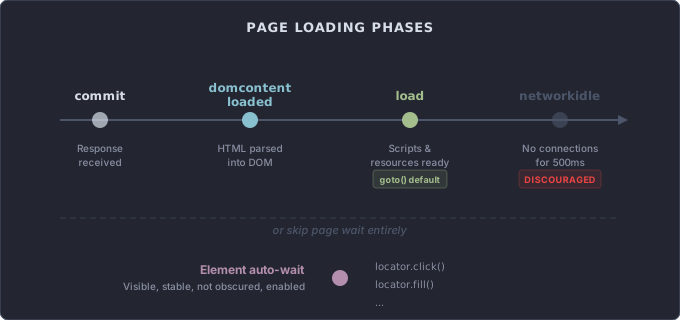
The earliest state you can wait for is commit. It resolves as soon as the network response is received and the document starts loading. You won’t have any DOM to work with yet, but it’s useful when you only need to confirm that navigation actually happened - for example, verifying that a form submission redirected to a success page before any content has rendered.
Document content loaded and parsed
When basic document is loaded and translated into your browser’s DOM, Playwright considers it a domcontentloaded state. That would usually mean that the carcass of the page is ready and visible. And here’s the catch: I would suggest sticking to it by default rather than going for load state as Playwright silently does. Why? Because DOM content is usually enough to get a grasp of the page and all the locators your models need. If you break the test by not waiting for load, then wait for load. But from my experience, it rarely helps to wait for load if your test broke at domcontentloaded. It usually means your application has some innate performance or even architectural issues that need to be addressed.
Scripts executed and resources loaded
When all the scripts are executed and resources are loaded, Playwright considers it a load state.
By the way, I keep saying “Playwright considers this or that”, but these terms and phases are actually basic web development concepts. You can see exactly the same marks if you open ‘Network’ tab in your browser’s devtools.
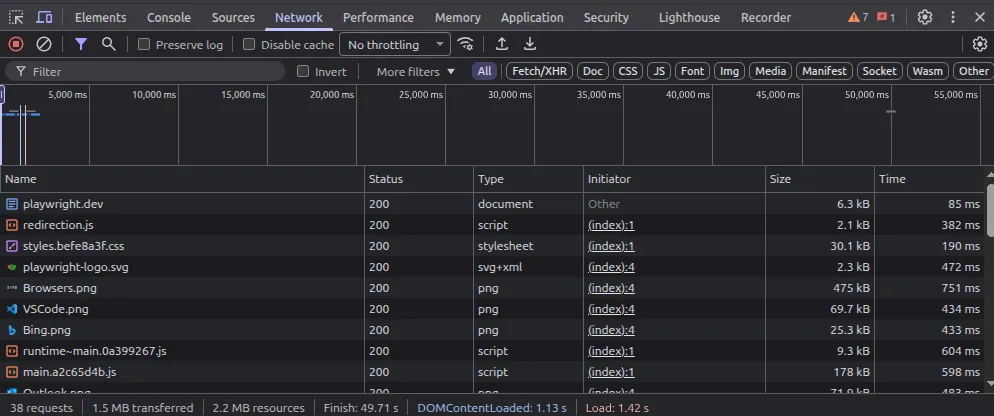
As mentioned before, this state is what Playwright waits for silently when going to or waiting for a URL. The pitfall here is waiting for resources to load. I had a lot of cases where due to CORS-related issues on test env or to some occasional outages on third-party services, tests just failed. Perfectly fine cases that did everything in proper order would fail on going to a URL because of something completely not related to the test at hand.
This is why I switched to rather minimizing page loading waits, but more on this later.
There are no network connections for at least 500ms
When network is idle for at least half a second, Playwright considers it a networkidle state. It means that your page has to not fire a single request, to not open a single connection or socket and to not do any polling. Well, modern web products are called web applications instead of webpages because they usually do all of that stuff. They do not sit idly after loading their static content. There is a lot of extra traffic being constantly sent from third-party things like GTM or other telemetry services.
Playwright itself marks this option as ‘DISCOURAGED’ in their docs. It’s the least reliable way to build a test flow.
Not waiting at all?
Playwright locators are getting resolved against the current DOM, no matter the page URL or state, at the moment you interact with them. So if you’re pretty confident that you’re dealing with a unique element, you might simply interact with it without waiting for anything. Playwright will wait for that element to be visible, stable, not obscured and enabled. When I know that particular elements I use are milestones of my tests, I don’t wait for page.
For example, when testing a search functionality, I interact with searchInput, enter some text and then can directly click productCard(searchedProductName). Search, navigation and page content loading will happen in the background. The result will be either my test finding and clicking locator or a timeout in trying to do so.
Of course, if your test case also involves something like “Make sure that URL changes to incorporate search query”, you need to wait for that URL. No shortcuts here.
Also, there might be cases when you just know that particular element in itself won’t work properly until other things are loaded. Instead of waiting for several elements, you can simply wait for domcontentloaded state or load state.
And yet another case of wanting to wait for page loading from my experience is when you want an additional time buffer between page loading and your element loading. For example, your page might contain a complex chart that is being drawn in real time using some JS magic. For stability I would prefer to wait for the page loading first and then wait for that chart to appear, just in case. Throwing all the complex waits in one line might be just too much. And also it’s not the most declarative way to do it.